← All services

Bible Reading

Original Words

Original Words shows the Hebrew and Greek behind each text word — pronunciation, lemma, and Strong number — and lets you follow every place a word is used.

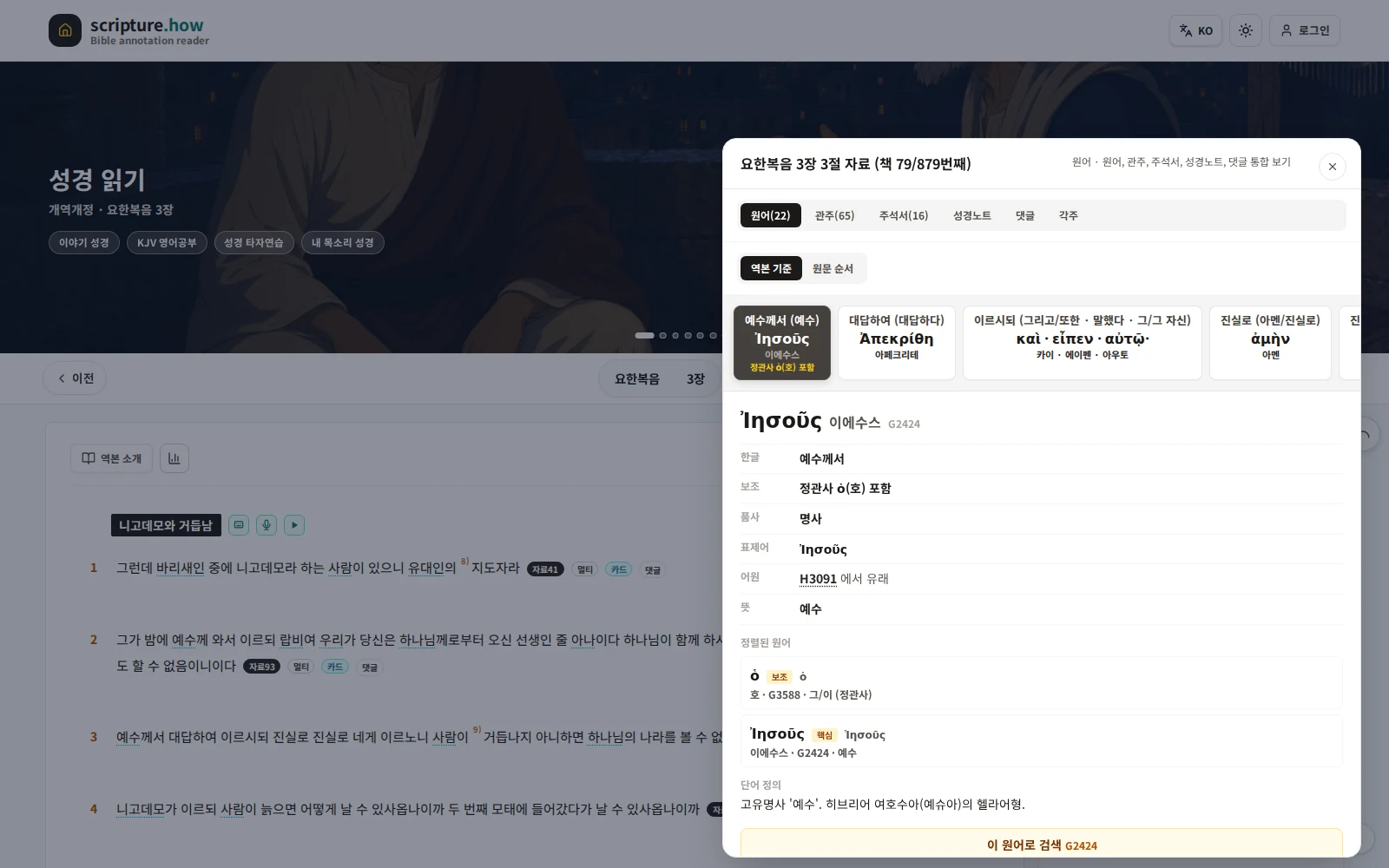
Original-language view preview

Original-language resource panel for John 3:3, with Greek word cards and lexicon information
Open the original-language tab from a verse’s resource button to check Greek or Hebrew words, meanings, pronunciation, and Strong numbers in context.

Original Words

Read each text word once more, in the original language

Original Words shows the original-language information of text words that translation alone can miss. In aligned verses you can see the Hebrew or Greek token matched to each text word, together with its pronunciation, lemma, and Strong number, and tap a word to continue into its dictionary entry and the other verses (occurrences) where the same word is used. Turn Original Words on within the Bible reading screen, and expand to original-word search when you want to look deeper.

01

Original Words in the reading screen

When you turn on Original Words in the Bible reading screen, original-language tokens are shown alongside the text words. You can place them on the right-side button, under the verse, or both.

02

Word explanation and dictionary

Tap an original word to see its pronunciation, lemma, Strong number, and lexicon explanation, with links to the Bible term dictionary and the concept dictionary.

03

Expand with original-word search

If you want to know how a single word is used across the whole Bible, narrow by language, book, and chapter in original-word search to gather every occurrence.

Aligned Tokens

Shown based on aligned words

Original-language spelling and pronunciation display accurately only when the original tokens are aligned to the text words. Verses that are not yet aligned may appear empty, and alignment is filled in progressively.

Text word ↔ original token alignment
Hebrew and Greek
Unaligned verses filled in progressively

Word Order

Both translation order and original order

Original tokens can be viewed in two orders. Translation order follows the word order of the translated text, showing the original matched to each word; original order follows the word order of the Hebrew or Greek source text itself. You can keep the flow you were reading in translation while checking the original, or follow the text in original word order.

Translation order: translated word order
Original order: Hebrew/Greek word order
Both orders provided

Lexicon

Strong numbers and dictionary explanations

Each original word is identified by a Strong number and lemma, and you can check its meaning through a lexicon explanation. Dictionary entries link to the Bible term dictionary and concept dictionary so you can move between the same concepts while studying.

Strong numbers
Lemma and pronunciation
Dictionary and concept links

Search

Find every occurrence of a word

In original-word search you can narrow by language (Hebrew/Greek), book, and chapter alongside the search term to gather the verses where the same original word is used. A word that comes to mind while reading can be carried straight into a search.

Language, book, chapter filters
Gather occurrences of the same word
Move between text and search

Sources

Sources and licensing of original-language data

Original tokens, Strong numbers, and dictionary data are managed with their licenses distinguished by source, and can be checked on the data sources and licensing pages.

Licenses distinguished by source
Original-data source notes
Public-domain and attribution compliance

Principle

One more layer of the original on top of the translation

Original Words does not replace translation; it is a supporting layer that helps you read the text more deeply. The intended flow is to keep it lightly on in the reading screen and expand to original-word search and the dictionary when you want to look further.